
 CRE Agents
Connect CRE Agents to Perplexity
Connect CRE Agents to Perplexity with a custom MCP connector: paste the name and address, turn it on, and sign in with your CRE Agents email.
You need: a Perplexity account and your CRE Agents email.
Step by step
Section titled “Step by step”-
Add a connector. Go to Connectors and click Add custom connector.
-
Paste the name and MCP server URL below.
-
Check the “I understand” box, then click Add.
-
Turn it on. Back on the connectors screen, open Available, click CRE Agents (Vic), then Add Connector, and sign in with your CRE Agents email.
CRE Agents (Vic)https://app.creagents.com/api/mcp
Copy the name exactly. The "(Vic)" is what lets you call on it later with "Use Vic".
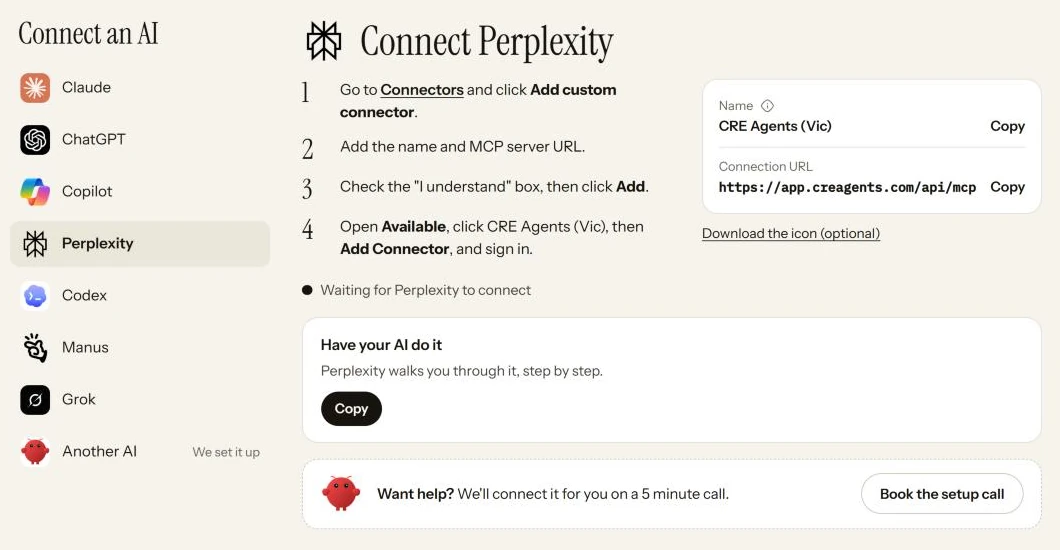
Have your AI do it
Section titled “Have your AI do it”On the portal’s Connect page, the Have your AI do it box has a ready-made prompt. Copy it and paste it into Perplexity, and it walks you through one step at a time.
Check that it worked
Section titled “Check that it worked”Start a new chat in Perplexity and type:
Use Vic to show me what you can do.
In the portal, Perplexity now shows up on Connected AIs in the left menu.
Next steps
Section titled “Next steps”© 2026 CRE Agents. All rights reserved.
AI can make mistakes. Please double-check responses. Not tax, legal, or investment advice.